Markdown Files as Project Memory: CLAUDE.md and Project Context
The problem this solves: Claude does not remember previous conversations. Every new session starts blank. If you want Claude to know who you are, what project you are working on, and how you want it to behave — you must tell it every time. Unless you use CLAUDE.md.
What CLAUDE.md is
CLAUDE.md is a plain text file (in markdown format) that you place in your project folder. Claude Code reads it automatically at the start of every session. Whatever is in this file becomes part of Claude's starting context — every time, without you doing anything.
It is your project's persistent memory.
your-project/
  CLAUDE.md            ← Claude reads this automatically on every launch
  documents/
    source1.pdf
    source2.pdf
  notes/
    ideas.md
  output/
    extracted_data.csv
Generating a starter CLAUDE.md
If you do not know where to start, Claude Code can draft the file for you:
/init
This command inspects your project folder and produces a first-draft CLAUDE.md. It will not know your research context — you will need to add the "who you are and what this project is" section — but it gives you the structure and catches any configuration that is already visible from the folder contents.
You can also ask directly:
I want to create a CLAUDE.md for this project. Ask me 5 questions about my research, then draft it.
What to put in CLAUDE.md
Anything Claude should always know. Common categories:
Who you are and what the project is
# Project: Inquisition Registers Languedoc 1245–1330

I am a historian at DISSINET working on inquisition records from Languedoc.
The project focuses on social networks among heretics and their supporters.
Key terms: perfecti, credentes, deposition, notarial formula, complicitas.
Your preferences for how Claude works
## Working preferences

- Output language: English unless I specify otherwise

- When extracting data, default format is CSV

- When summarising texts, include direct quotes with page numbers

- Do not add unsolicited suggestions or commentary — answer what I ask
Folder structure
## Project structure

- /documents/ — primary source PDFs (do not modify)

- /transcriptions/ — my working transcriptions in .md

- /output/ — extracted data, always write here

- /notes/ — my running notes, feel free to append
Recurring context
## Research context
Dates are in the Julian calendar. Person names appear in Latin, Occitan, and French variants.
When you encounter the same person under different name forms, flag this.
The main dataset is in data/network.xlsx — columns are: person_id, name, role, date, source_ref.
Tools and integrations
## Tools available

- Zotero MCP is connected — use it when I ask for sources or citations

- My Zotero library covers Catharism, Waldensianism, and medieval inquisition broadly
CLAUDE.md is not a one-time setup
It is a living document. Update it as your project evolves:
-
Add new folder structure when you reorganise
-
Add conventions you find yourself repeating in conversation
-
Add context about the current phase of work ("we are currently in the transcription phase")
-
Remove things that are no longer true
Think of it as the briefing document you would give a new research assistant on their first day — and keep it updated as the project changes.
Keeping CLAUDE.md alive: three tools
The gap between a CLAUDE.md that helps and one that goes stale is usually the absence of a maintenance habit. Three Claude Code commands support this:
/reflection — run at the end of a session. Ask Claude to review what just happened and propose additions to CLAUDE.md: conventions you established, corrections you made, patterns that should be permanent. Review the suggestions; confirm the ones that belong in the file.
This is not a built-in Claude Code command — it is a custom command you install once. Save a markdown prompt file to ~/.claude/commands/reflection.md and it becomes available as /reflection in every project. The prompt itself is a public community resource; search for "claude reflection command gist" to find the standard version. Once installed:
> /reflection
This turns a correction you typed once into a rule Claude will follow from the next session onward. Without it, you repeat the same corrections indefinitely.
/insights — run periodically (monthly or after a major phase). Analyzes your usage history across sessions, identifies recurring patterns, and suggests CLAUDE.md additions. Where /reflection captures single-session lessons, /insights finds patterns you did not notice were patterns.
> /insights
The report appears in ~/.claude/usage-data/. It shows which kinds of clarifications you give repeatedly — those are the candidates for promotion into CLAUDE.md.
The rhythm: start with /init to draft the file → work normally → use /reflection to capture lessons after each session → use /insights to zoom out → prune rules that are no longer relevant. A CLAUDE.md that evolves through real use is more useful than one written comprehensively on day one.
Multiple CLAUDE.md files
Claude Code supports CLAUDE.md at multiple levels:
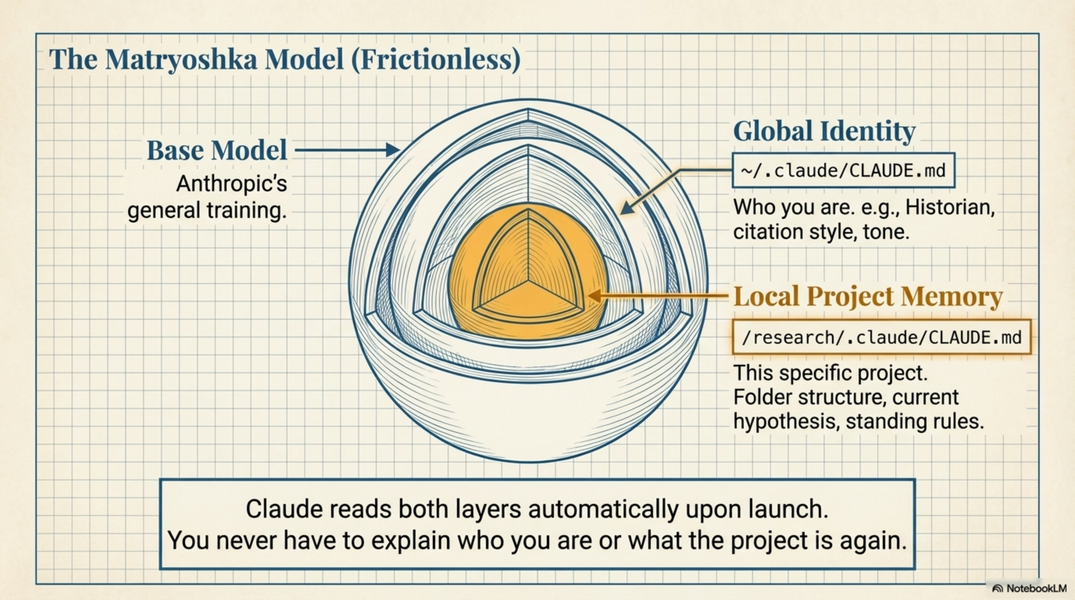
~/.claude/CLAUDE.md          ← global (applies to all projects)
your-project/CLAUDE.md       ← project level
your-project/subfolder/CLAUDE.md  ← subfolder level (rare)
Global CLAUDE.md (~/.claude/CLAUDE.md) is useful for personal preferences that apply everywhere:
# My global preferences
I am a historian. I prefer concise responses.
When I ask for a summary, default to 3 paragraphs unless I say otherwise.
Always cite sources when making factual claims.
Project CLAUDE.md is for project-specific context. Most of your effort goes here.
Markdown files as running notes
Beyond CLAUDE.md, you can use markdown files generally as a lightweight personal knowledge base that Claude can always read.
A useful pattern: keep a notes/progress.md or notes/log.md in your project:
# Research log

## 2025-03-10
Processed registers 1–12. Extracted 340 deposition entries.
Notable finding: cluster of credentes in Montaillou region, 1308–1320.
TODO: cross-reference with Duvernoy's edition.

## 2025-03-11
Started on registers 13–20. Noticing inconsistent name spellings for "Guilhem".
Then in conversation:
> Read my progress log and remind me where I left off last week.
Claude reads the file, tells you. No copy-pasting, no searching through your own notes.
The difference from Desktop Projects
Claude Desktop Projects also persist context — but with limitations:
-
Files are uploaded copies, not live disk access
-
Size and count limits on attached files
-
No way to update context automatically as files change on disk
CLAUDE.md in Claude Code:
-
Always reflects the current state of the file on disk
-
No size limits (within context window)
-
You edit it like any other text file
-
Claude re-reads it fresh each session
Practical tips
Start small. A 10-line CLAUDE.md is better than no CLAUDE.md. Add more as you discover what you keep repeating.
Put folder structure in it. "Write outputs to /output/" prevents Claude from writing files in unexpected places.
Put your name and role in it. It changes how Claude calibrates its responses — it will not explain what a deposition is if it knows you are a specialist.
Put conventions in it. Date formats, name conventions, column names in your data files, citation style — anything you want Claude to follow consistently.
Keep it readable. CLAUDE.md is also useful to you — it is documentation of your project conventions. Write it for yourself as much as for Claude.
Use headers. Claude parses markdown structure. Clear sections (Project, Structure, Preferences, Context) make the file easier for both you and Claude to navigate.
Keep it under 200 lines. Above that, Claude starts treating it as low-priority background material rather than active instructions — adherence drops measurably. Trim ruthlessly.
Communicate intent, not just rules. Bare rules are brittle. A rule with a reason behind it lets Claude generalise to situations you did not anticipate:
| Weaker | Stronger |
|---|---|
"Never modify /sources/" |
"Never modify /sources/ — these are original archival files; all derived files go to /output/" |
| "Use CSV output" | "Use CSV output — the downstream tool is Excel and cannot read JSON" |
| "Do not change person IDs" | "Do not change person IDs — they are primary keys cross-referenced across three datasets" |
When Claude understands why a constraint exists, it can apply the right judgment in edge cases.
What to include / what to leave out:
| Include | Leave out |
|---|---|
| Recurring commands and workflows specific to this project | Instructions that change every session |
| Output format preferences ("always CSV, not JSON") | Tasks you only do once |
| Folder structure and where to write files | Long lists of exceptions and edge cases |
| Standing rules with their reasons | Content that is already in the code or file structure |
| Domain vocabulary and name conventions | Confidential information you would not share |
Too long is as bad as too short. A CLAUDE.md that tries to cover every case will dilute the instructions that matter.
Referencing other files from CLAUDE.md: Use the @ import syntax to pull in content from other files without copying it:
## Project conventions
@conventions/style-guide.md
@conventions/name-variants.md
Claude will read those files as part of reading CLAUDE.md. Useful for separating stable conventions (in their own files) from project context (in CLAUDE.md proper).
Official documentation: code.claude.com/docs — CLAUDE.md reference, including /init command and file import syntax.
Related
-
A.markdown.token-efficient-docs — how to write CLAUDE.md and meta-documents so Claude processes them efficiently; extends the practical tips above
-
A.concept.under-the-hood — why context persistence matters (context window concept)
-
A2.desktop-basics — Desktop Projects as the alternative approach
-
A3.code-basics-non-programmers — where CLAUDE.md lives in your project
-
A13.examples-dissinet-usecases — example CLAUDE.md for historical research
-
A.markdown.history — the complement to CLAUDE.md: why keep a project history file
-
A.markdown.meta-docs — the full meta-document practice: _history, _ownership, progress, _index as a system alongside CLAUDE.md
-
A.issue.personalisation — the full personalisation system: CLAUDE.md as Layer 1, plus Memory, Skills, Hooks, MCP, and the accountability files layer; the complete setup sequence
-
A.issue.research-data-memory — extending CLAUDE.md for data-heavy projects: domain knowledge files, transformation logs, data variants
-
A.issue.session-endings — the end-of-session audit: what gets lost when the conversation closes; the complement to session-start context restoration