Global vs. Local Claude: How Your Working Directory Shapes Everything
The key insight: Launching claude from different folders gives you meaningfully different Claude sessions — different context, different memory, different tools, different permissions. The directory you start from is not just "where the files are." It is the project environment that configures how Claude behaves.
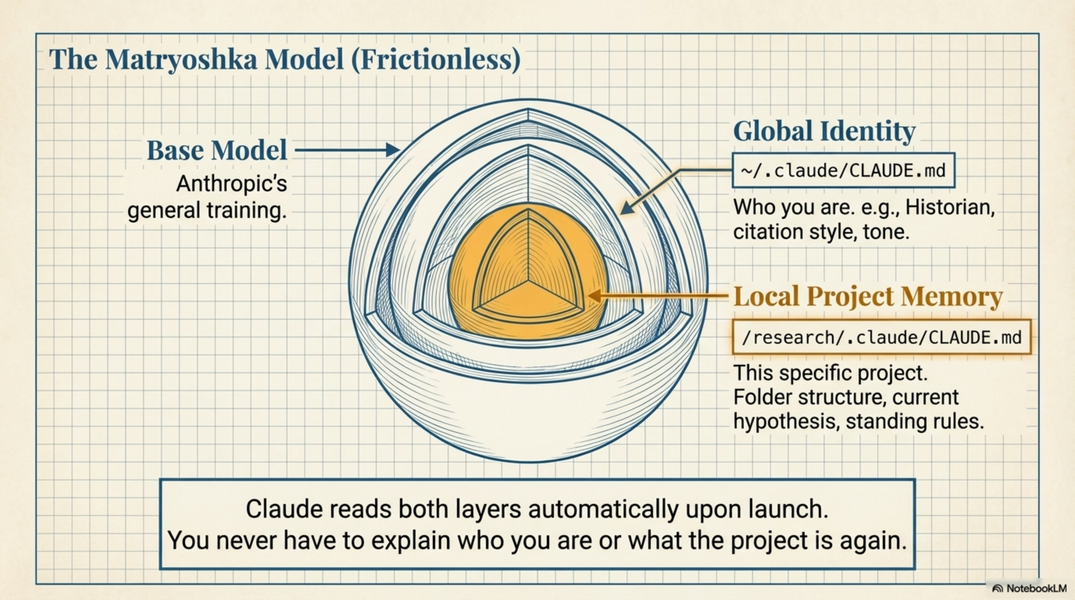
Two layers, always combined
Every Claude Code session loads two layers simultaneously:
GLOBAL LAYER (~/.claude/)
  ├── CLAUDE.md              your identity, cross-project preferences
  ├── commands/              skills available everywhere
  └── settings.json          default permissions, global MCP servers

        +

LOCAL LAYER (your current folder)
  ├── CLAUDE.md              this project's memory and conventions
  ├── CLAUDE.local.md        personal overrides (gitignored, not shared)
  ├── .claude/commands/      skills specific to this project
  └── .claude/settings.local.json   project permissions, MCP overrides
Claude reads both layers every time it starts. The local layer adds to — and can override — the global layer. What you end up with is a Claude that knows who you are and knows what project it is in.
CLAUDE.local.md is for personal project overrides you do not want committed to git. If you share a project CLAUDE.md with colleagues but have personal preferences for how you work in that project, put them here. It is automatically gitignored. Example use: a shared project CLAUDE.md says "output language: Czech"; your personal CLAUDE.local.md says "output language: English unless I specify otherwise."
What this means in practice
Launching from /research/montaillou/:
-
Loads your global identity (historian, citation style, preferences)
-
Loads the Montaillou project CLAUDE.md (inquisition registers, network data, folder structure)
-
Has access to a Zotero library scoped to medieval heresy sources
-
Can use
/extract-persons— a custom skill defined for this project
Launching from /research/grant-writing/:
-
Loads the same global identity
-
Loads the grant project CLAUDE.md (current funder, budget constraints, team)
-
May have a different MCP server — e.g., connected to a shared Drive folder
-
Has
/draft-sectionand/check-word-count— skills that make sense here
Same installation of Claude Code. Same model. Completely different configured environment.
The global layer: your permanent self
The global CLAUDE.md (~/.claude/CLAUDE.md) is the right place for things that are always true about you:
# About me
I am a historian specialising in medieval religious movements.
I work at DISSINET (dissinet.cz).
My default citation style is Chicago author-date.
I prefer concise responses. Do not add unsolicited caveats.
When summarising academic texts: argument, evidence, method — in that order.
This loads in every session, in every project. You write it once, it applies everywhere.
Global commands (~/.claude/commands/) are for skills you use across projects:
-
/to-md— convert any file to markdown -
/to-docx— convert markdown to Word -
/summarise— your standard paper summary format
The local layer: this project's context
The project CLAUDE.md is for things that are only true here:
# Montaillou Network Project

Current phase: data extraction from Fournier Register transcriptions.
Key argument: kinship ties structured heretical belief transmission, 1300–1320.

## Folder structure

- /sources/      — original PDFs, do not modify

- /transcriptions/ — working DOCX transcriptions

- /output/       — extracted data, always write here

## Conventions

- Dates: Julian calendar; convert to Gregorian and note conversion

- Names: canonical form is Occitan; note Latin variants in brackets

- Confidence: mark uncertain extractions with [?]
Local commands (.claude/commands/) are for project-specific workflows:
-
/extract-persons— runs your standard person extraction prompt against a file -
/add-to-log— appends a dated note to progress.md
These commands appear only when you are in this project folder. They do not clutter other projects.
How to set up the global layer
The global layer lives in ~/.claude/ — a hidden folder in your home directory. You only need to set this up once.
~ means your home folder:
-
Mac:
/Users/yourname/ -
Windows:
C:\Users\yourname\
The .claude folder may already exist if you have installed Claude Code. Hidden folders (starting with .) are not shown by default in file browsers — but you can navigate there in the terminal.
The easy way: ask Claude to do it
The simplest approach is to let Claude Code create the global files for you. Launch Claude Code from anywhere (your home folder is fine for this), then:
> Create a global CLAUDE.md file at ~/.claude/CLAUDE.md
  with a template I can fill in. Include sections for:
  who I am, my research preferences, my citation style,
  and my output preferences.
> Create the folder ~/.claude/commands/ if it does not exist.
  Then create a global /to-md skill that converts any file
  to markdown using markitdown.
Claude will create the files and folders. You can then open and edit them in any text editor.
The manual way
Mac — open Terminal and run:
mkdir -p ~/.claude/commands
open ~/.claude
The second command opens the .claude folder in Finder. You can then create and edit files there with any text editor (TextEdit, VS Code, BBEdit, etc.).
Windows — open PowerShell and run:
New-Item -ItemType Directory -Force "$env:USERPROFILE\.claude\commands"
explorer "$env:USERPROFILE\.claude"
This creates the folder and opens it in File Explorer. Create and edit files with Notepad, VS Code, or any editor.
What to create
~/.claude/CLAUDE.md — your global identity. Start minimal:
# About me
I am a historian specialising in medieval religious movements at DISSINET.
My citation style is Chicago author-date.
I prefer concise responses without unsolicited caveats.
When summarising academic texts: argument, evidence, method — in that order.
Output language: English unless I specify otherwise.
~/.claude/commands/ — one .md file per global skill. See A.markdown-central for ready-to-use skill files (/to-md, /to-docx, /convert-folder).
~/.claude/settings.json — global permissions and MCP servers. Most researchers can leave this empty to start; add MCP servers here when you want them available everywhere. See A.setup.settings-local.
Verifying it works
After creating ~/.claude/CLAUDE.md, launch Claude Code from any project folder and ask:
> What do you know about me from my global configuration?
Claude should describe what is in your global CLAUDE.md. If it cannot, the file is in the wrong place or has a formatting issue.
Why cd before claude is not optional
This is the practical consequence of everything above.
If you launch Claude from your home folder or Downloads, it loads only the global layer. It does not know about your project. It cannot find your files by short name. Your project CLAUDE.md does not load. Your project skills are not available.
The habit:
cd /path/to/your/project    # ← activates the project environment
claude                       # ← launches with full context
On Windows: navigate to the folder in File Explorer, type powershell in the address bar, then claude.
Ten seconds. Every time. It is the difference between a Claude that knows your project and a Claude that does not.
MCP servers can also be scoped
MCP servers (Zotero, web search, etc.) can be configured globally or per-project.
Global MCP (~/.claude/settings.json): available in all sessions — useful for tools you always want, like web search or a personal Zotero library.
Local MCP (.claude/settings.local.json): available only in this project — useful for tools that are specific to one project, like a shared team database, a project-specific Zotero group library, or a folder of files you only want Claude to access here.
{
  "mcpServers": {
    "zotero-montaillou": {
      "command": "npx",
      "args": ["-y", "zotero-mcp"],
      "env": {
        "ZOTERO_GROUP_ID": "12345"
      }
    }
  }
}
When you are in the Montaillou project, Claude has access to that group library. In other projects, it does not.
Summary
Global (~/.claude/) |
Local (project folder) | |
|---|---|---|
| CLAUDE.md | Who you are, permanent preferences | This project's memory and conventions |
| Commands | Skills for everyday use | Skills specific to this project |
| Settings | Default permissions, global MCP | Project permissions, project MCP |
| When active | Always | Only when launched from this folder |
Build the global layer once. Build a local layer for each project. Launch from the right folder. Everything else follows.
Related
-
A9.markdown-project-memory — what to put in CLAUDE.md at each level
-
A.setup.settings-local — configuring permissions and MCP per project
-
A.markdown-central — global vs. local custom skills in practice
-
A3.code-basics-non-programmers — navigating to a folder before launching