The "Upload Dance" Problem
Status of the term: Not a formally named or documented concept. It is a descriptive label for a friction pattern that is widely experienced and frequently complained about by power users of Claude Desktop and similar chat-based AI interfaces. The name is informal.
What it is
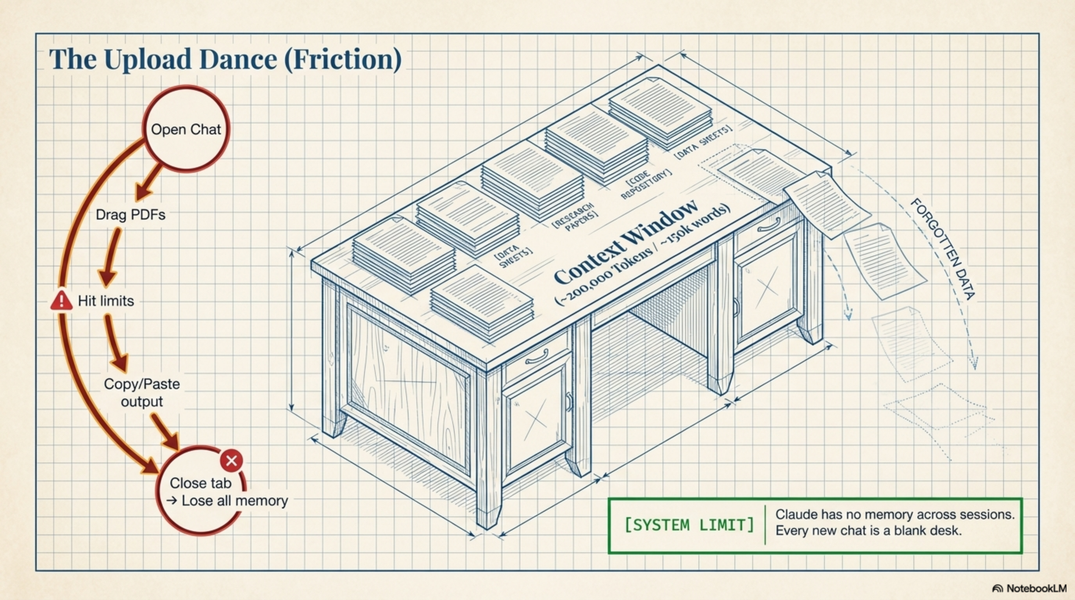
The "upload dance" is the repetitive, manual cycle of attaching files to a chat interface, doing work, copying output out, and repeating — session after session — because the interface has no direct access to your filesystem.
In Claude Desktop, working with documents looks like this:
- Open a new conversation
- Manually attach the PDF/DOCX/XLSX you want to work with
- Ask your question or give your instruction
- Claude responds — but output lives only in the chat
- Copy-paste the result back into your own file, or download it
- Next session: repeat from step 1 — files do not persist
For a researcher working with many documents, this becomes a significant daily friction.
Specific manifestations
No filesystem access Claude Desktop cannot see your files. It only knows about what you manually attach in a given conversation. It cannot say "read the file at Documents/project/draft.docx."
No folder or batch access You cannot say "here is my folder of 30 archive PDFs, process them all." You must upload each file individually, manually.
Files do not persist between conversations Each new conversation starts blank. Even if you uploaded a 200-page PDF yesterday, you must upload it again today. (Claude Desktop Projects partially mitigate this — files added to a Project persist — but with limits on number and size.)
Output has no way back to disk When Claude produces a revised draft, a table of extracted data, or a structured summary, there is no "save to file" option. You copy the text from the chat window and paste it somewhere yourself.
File size and number limits Large PDFs (especially image-based scans) and many simultaneous attachments hit size or count limits.
Re-uploading context documents If you maintain a project context document (your notes, instructions, background on the research), you must re-upload or re-paste it in each new conversation, or maintain a Project for it.
Why it matters for researchers
A historian or social scientist working with Claude Desktop on a typical task — "read these 15 interview transcripts and extract mentions of X" — faces:
-
15 manual uploads
-
No way to run this over a folder automatically
-
No way to write the output directly to a spreadsheet
-
If the context window fills up, the task must be split and re-started with re-uploads
This is manageable for occasional or one-off tasks. It becomes a real workflow bottleneck for anything systematic or batch-oriented.
How Claude Code solves it
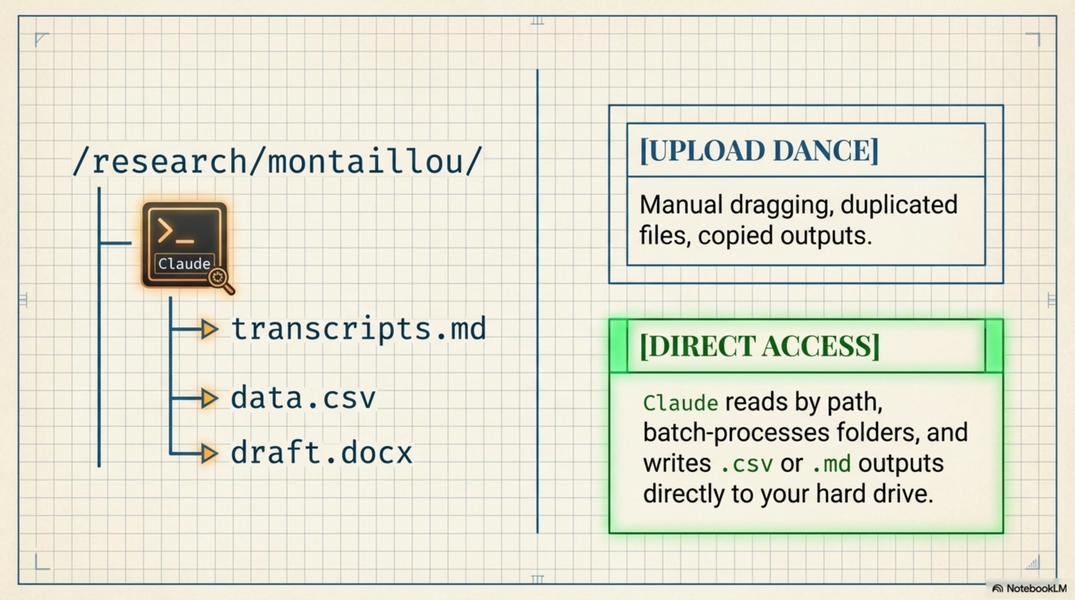
Claude Code runs in your terminal with direct access to your filesystem. This changes the situation fundamentally:
-
Read any file directly by path — no upload needed
-
Read entire folders — "go through every PDF in this folder and..."
-
Write output directly to files — results land on disk automatically
-
Persistent project context — a
CLAUDE.mdfile in your project folder is always read at startup; no re-uploading -
No session-by-session re-attachment — the files are just there, on your disk, always accessible
The workflow becomes: open terminal, start Claude Code, describe what you need. The files are already there.
Relevance to the workshop
This is the clearest concrete argument for why a non-programmer researcher should bother with Claude Code. The "upload dance" is something all Desktop users recognise from their own experience — naming it and showing the solution is an effective way to motivate the switch.
Demonstrating live: open a folder of PDFs, ask Claude Code to extract structured information from all of them, watch it write a CSV to disk. This takes ~2 minutes and is impossible to replicate in Desktop without significant manual effort.
Related
-
A1.desktop-vs-code — full comparison of the two tools
-
A3.code-basics-non-programmers — how to get started with Code
-
A13.examples-dissinet-usecases — concrete research tasks where this matters