Privacy and Security: Where Your Data Actually Goes
Why this matters: Every researcher using Claude is making a data-sharing decision, whether they think about it consciously or not. The right choice varies by what kind of data you are working with — and the differences between the tools are significant. This document gives you the mental model to make that decision well.
The core question: where does your data go?
When you give Claude a document, a transcript, a database extract, or a prompt — where does it go?
The answer depends entirely on which tool you are using.
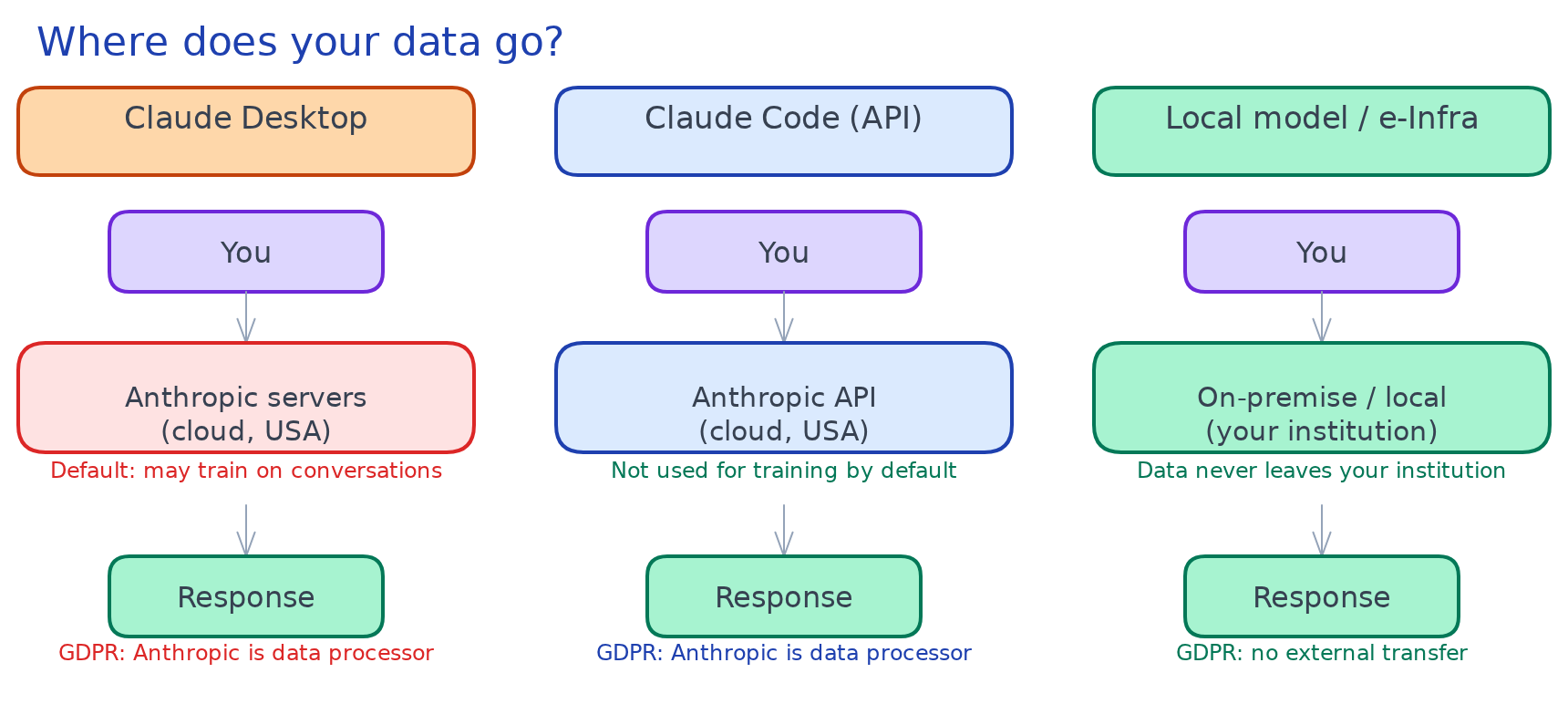
Claude Desktop (and Claude.ai in the browser)
Your input is sent over the internet to Anthropic's servers. Anthropic processes it there and returns a response. Your data leaves your machine.
What Anthropic does with it:
-
By default, Anthropic may use conversations to improve its models (training data)
-
You can opt out of this in Claude Desktop settings: Settings → Privacy → "Improve Claude for everyone"
-
Conversations are stored on Anthropic's servers; retention periods apply
-
Anthropic's privacy policy governs what they do with the data
Practical implication: Anything you type into Claude Desktop — including document contents, interview extracts, database records, personal data about research subjects — is transmitted to and stored on external servers.
Claude Code (running in your terminal)
Claude Code calls the Anthropic API. Your prompts and file contents are still sent to Anthropic's servers for processing — but:
-
API conversations are not used for model training by default (this is Anthropic's stated policy for API use)
-
You retain more control over what gets sent, because you are composing the prompts explicitly
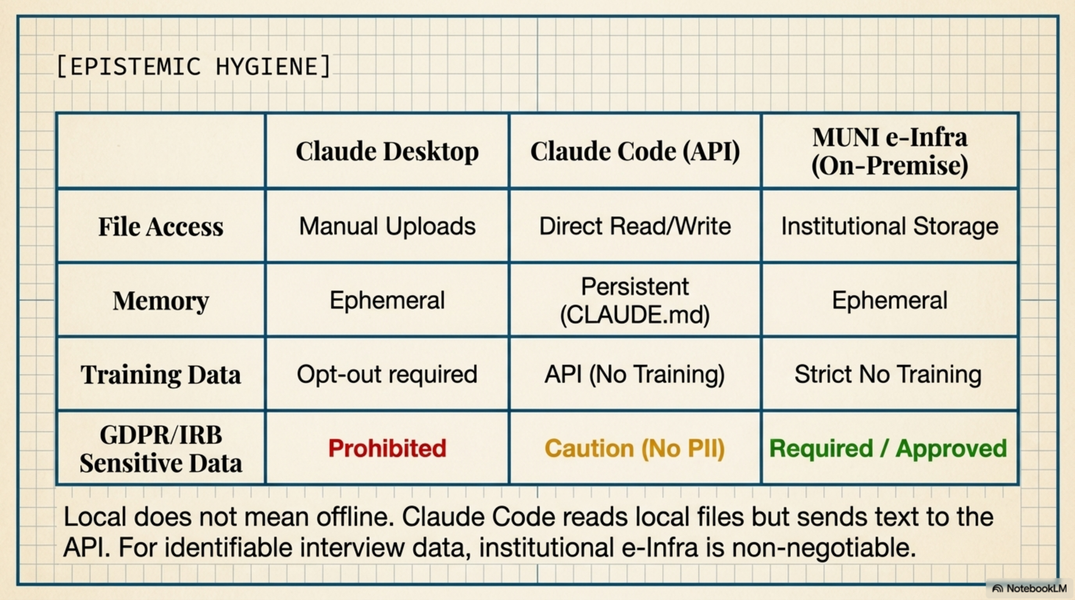
Important: "Local" does not mean the data never leaves your machine. It means the files on your disk are not uploaded; instead, Claude Code reads them and includes their contents in the API call. That content is still sent to Anthropic.
The real local exception: If you run an open-source model (LLaMA, Mistral, etc.) locally via Ollama or a similar tool, nothing leaves your machine. Claude is not this — Claude always requires an API call.
MUNI e-Infra AI platform
Runs on MUNI infrastructure. Data does not leave the institution. The appropriate choice for genuinely sensitive data under MUNI's data security rules.
The decision matrix
| Data type | Desktop | Claude Code (API) | e-Infra / local model |
|---|---|---|---|
| Published sources, public data | ✓ fine | ✓ fine | fine |
| Your own writing, drafts, notes | ✓ fine | ✓ fine | fine |
| Pre-publication research data (no personal data) | caution | ✓ better | best |
| Interview transcripts (anonymised) | check IRB/policy | ✓ better | best |
| Interview transcripts (identifiable) | no | no | required |
| Personal data of living subjects | no | no | required |
| Embargoed or confidential source material | caution | ✓ better | best |
| Unpublished database / corpus (proprietary) | caution | ✓ better | best |
| Credentials, API keys, passwords | never | never | n/a |
"Check IRB/policy": If your research ethics approval or institutional policy specifies how data may be processed, that governs. Some IRB protocols explicitly prohibit using third-party cloud AI tools on participant data. Read your approval before uploading transcripts anywhere.
The agentic risk: what Claude Code can see
Claude Code has access to your filesystem — that is what makes it powerful. It also introduces a risk that does not exist in Desktop: Claude can read files you did not intend to share.
Common examples:
.env files and API keys. Projects often have a .env file containing database passwords, API tokens, or service credentials. If Claude Code is working in a project folder and reads a .env file as context, those credentials appear in an API call. If you then share that conversation, they are exposed.
Personal notes and journals. If you use Claude Code from a home folder that contains personal writing, it may read those files when building context for unrelated tasks.
Unpublished manuscripts. A project folder for one paper may sit next to another that is under embargo or in confidential review.
Practical rules:
-
Keep credentials in
.envfiles and add.envto your.gitignoreand.claudeignore -
Never paste API keys, passwords, or tokens directly into a Claude prompt
-
Be aware of what else is in your working directory when starting a Claude Code session
-
For sensitive projects, use a dedicated project folder — do not run Claude Code from a folder that mixes sensitive and non-sensitive material
Using .claudeignore
A .claudeignore file works exactly like .gitignore: place it in your project root and list the files and folders Claude should never read, even if they are in the working directory. Claude Code respects it silently — the files remain on disk but are invisible to Claude.
Create the file in your project folder:
# .claudeignore

# Credentials and secrets
.env
.env.*
secrets/
*.key
*.pem

# Raw data with personal information
data/interviews/
data/raw/
participants/

# Unrelated personal material
personal/
journal/

# Pre-publication or embargoed work
embargoed/
under-review/
When to use it:
-
You run Claude Code from a folder that mixes research code with raw data — ignore the data folder
-
Your project has a
.envfile with database credentials — ignore it explicitly (even if.gitignorealready excludes it;.claudeignoreis a separate mechanism) -
You work from a home directory or a shared research folder where Claude might pick up unrelated files
The key distinction from .gitignore: .gitignore controls what gets committed to version control. .claudeignore controls what Claude can read. The two files are independent — a file can be in .gitignore but still readable by Claude, and vice versa. For sensitive files, you usually want both.
The browser extension risk: prompt injection
The Claude for Chrome extension introduces a risk category distinct from everything above — not about where your data goes, but about what a web page can make Claude do.
What prompt injection is: When Claude reads a web page, malicious content on that page can contain hidden instructions attempting to hijack Claude's actions — telling it to exfiltrate information, perform actions you did not request, or manipulate what it says to you. Unlike the other risks in this document, this one comes from outside content, not from your own inputs.
Anthropic measured a 23.6% attack success rate in autonomous mode before mitigations, dropping to 11.2% after. These figures are from Anthropic's own safety testing — they are not theoretical.
The specific risks for researchers:
-
Browsing an academic publisher site while Claude is active: a page with malicious scripts could instruct Claude to take actions in another tab you have open
-
Reading a document on an institutional portal while authenticated: Claude could be instructed to act on other authenticated pages
-
Using Claude to assist with email while also browsing unknown sources: a malicious page read in one tab could attempt to instruct Claude acting in Gmail in another
Practical rules for Chrome extension use:
-
Use "ask before acting" mode — Claude will request confirmation before clicking or submitting anything
-
Avoid using the extension while authenticated to financial, medical, legal, or institutional portals you would not want Claude acting on
-
Be sceptical of any unexpected action Claude suggests on a page you did not ask it to interact with
-
The extension is most safely used for reading and summarising — not for autonomous multi-tab action
Google Workspace connectors (Gmail, Calendar, Drive): These connectors send your email and calendar content to Anthropic's servers for processing, under the same conditions as any Claude conversation (API calls, not used for training). Anthropic explicitly states they do not train models on Google Workspace connector data. The prompt injection risk does not apply to these connectors — they use structured API access, not free-form page reading.
GDPR and research ethics
For researchers at EU institutions, GDPR applies to the processing of personal data — including giving it to an AI system.
Personal data in the GDPR sense includes: names, email addresses, location data, health information, and any information that can identify a living person. Interview transcripts often contain personal data even when partially anonymised.
Sending personal data to Claude Desktop or the API means:
-
Anthropic becomes a data processor under GDPR
-
You (or your institution) are the data controller
-
You are responsible for having a lawful basis for that processing
-
Anthropic's servers are located outside the EU (US) — cross-border transfer rules apply
What this means in practice: For research involving personal data of living subjects, check your institution's data processing agreements before using any external AI tool. MUNI's guidance is: use e-Infra or other institutional platforms. This is not optional for data that falls under your research ethics approval.
For historical research involving long-deceased subjects (the DISSINET context), GDPR personal data protections do not apply — though institutional policies on unpublished research data still do. There is a separate concern GDPR doesn't cover at all: the critical editions and transcriptions researchers produce from these sources are themselves scholarly work, with their own claim to attribution and control over reuse. A source being out of copyright, or its subject long dead, does not mean the edition built around it should be handed over freely as AI training material — that value belongs to the editors who did the work, not to whichever model ingests it next.
What "private" actually means on Anthropic's platform
To be concrete about what the privacy settings do and do not do:
Opting out of training data (Claude Desktop): Turns off the use of your conversations for model improvement. Your conversations are still stored on Anthropic's servers; they are just not used for training.
Deleting conversations: Removes them from the visible interface. Retention in server logs may continue for some period per Anthropic's policy — check the current policy for specifics.
API use (Claude Code): By default not used for training. Subject to Anthropic's API usage policies. Anthropic may still log API calls for safety monitoring and abuse prevention.
None of these options keep data on your machine. For that, you need a locally-run model.
The institutional dimension: approved tools at MUNI
MUNI's data security rules (binding, not just guidelines) state:
Do not input personal data, confidential documents, or sensitive research data into non-approved tools.
Approved for sensitive data: Microsoft Copilot (institutional), Google Gemini (institutional), e-Infra AI Models (on-premise).
Claude is not on the approved list — not prohibited for non-sensitive content, but not approved for sensitive data processing. Claude Code running locally processes files on your disk but still sends their contents to Anthropic via API. This means Claude Code does not satisfy the "data stays within MUNI" requirement that e-Infra meets.
The practical implication for DISSINET: Most DISSINET work involves historical materials and published or pre-publication research data — not personal data of living subjects. This puts it in the "caution, not prohibited" category for Claude. But pre-publication database records and unpublished corpus data should go to Claude Code (API, no training) rather than Claude Desktop, and identifiable interview data (if any) should use e-Infra.
Quick reference: before you paste that document
Ask yourself:
- Is this personal data of living subjects? → e-Infra or local model only
- Does my research ethics approval say anything about third-party AI processing? → check before using Desktop
- Is this pre-publication or embargoed? → Claude Code (API) preferable to Desktop; e-Infra if highly sensitive
- Does the folder I'm working in contain credentials or unrelated sensitive files? → check
.claudeignore - Am I pasting an API key or password anywhere in this prompt? → stop, never do this
Related
-
A.adjacent.open-weight — the "real local exception" (§1) explained fully: what open-weight models are, licensing, capability gap, and when they're worth the setup cost
-
A1.desktop-vs-code — the full comparison of tools; the data flow difference is one dimension of it
-
A.adjacent.tools — Chrome extension and Google Workspace connectors in detail
-
A.critical.limitations — the qualitative research caution and the broader IRB point
-
A.concept.agents — what Claude Code can access when running in agent mode
-
A.setup.settings-local —
.claudeignoreand permission settings -
E.muni-guidelines — MUNI's binding data security rules and approved tool list
-
E.journal-funder-policies — publisher and funder requirements on data handling